Portfolio · Salesmate

No-Code
AI Agent
Builder

Designing a no-code tool that lets non-technical sales teams build, train, and deploy AI agents - without writing a single line of code.

salesmate.io · AI Pilots
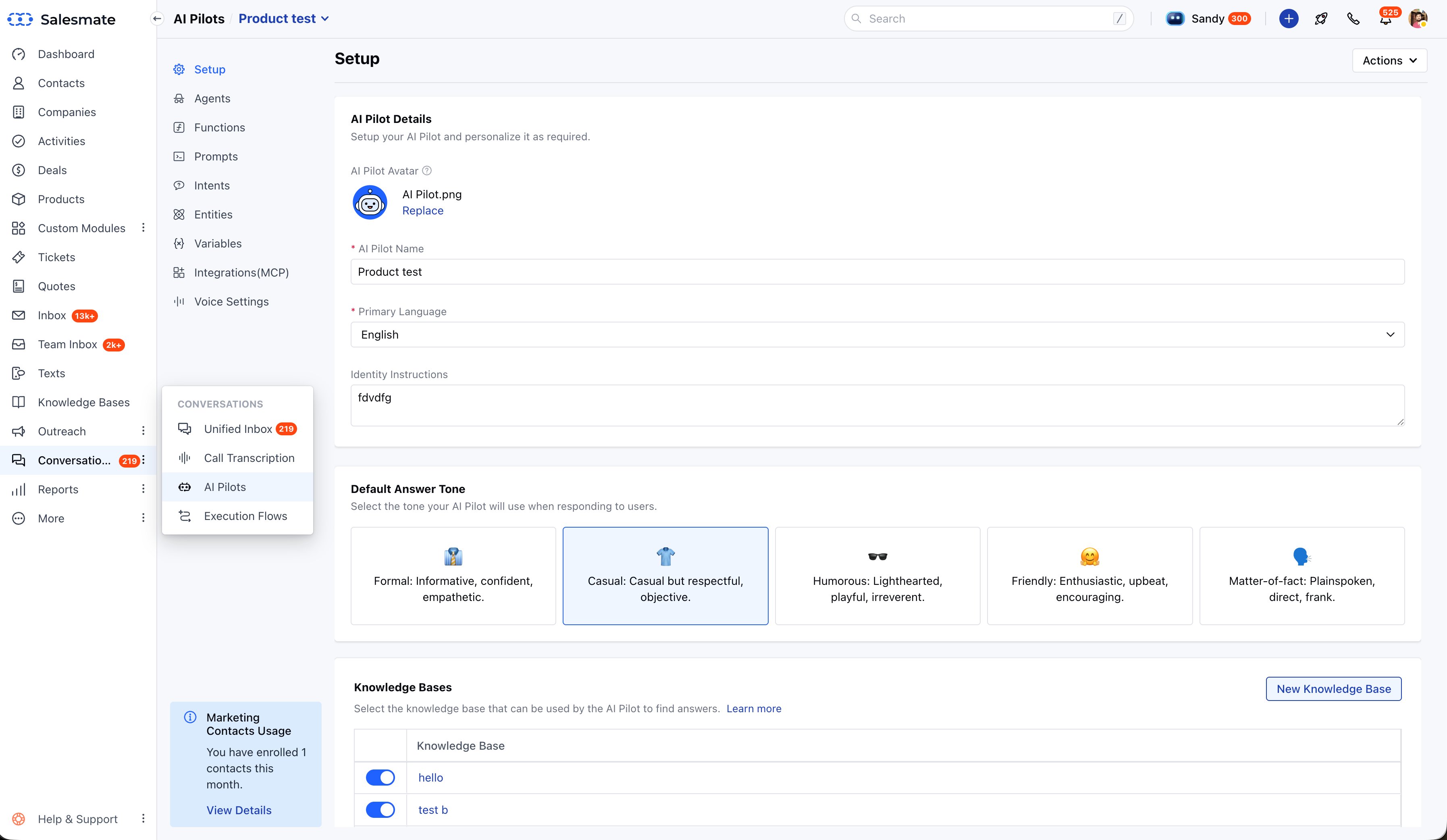
AI Pilots - Setup · Identity & Tone configuration
Role
Product Design Lead
Timeline
3 Months
Platform
SaaS Web App
Tools
Figma · Whimsical · Storybook
01

Project Overview

The Product
Skara AI Agent Builder - part of Salesmate's AI Agents platform. A no-code tool for building and deploying AI agents across web, WhatsApp, SMS, and voice channels.
The Goal
Make AI agent setup accessible to non-technical sales managers - removing the dependency on developers for every new agent configuration.
My Contribution
End-to-end product design - user research, information architecture, high-fidelity UI, design system components, and developer handoff.
Design System
New components built on Salesmate's Global Design System and fed into sm-framework - Salesmate's internal Angular component library.

Salesmate customers wanted to use AI to automate support and sales conversations - but existing tools required coding knowledge or complex API setup. The goal was to abstract that complexity into a flow that felt like onboarding a new team member, not programming a system.

02
"How might we help non-technical sales managers build, train, and deploy safe AI agents without writing a single line of code?"
01 - COMPLEXITY
AI is intimidating
Terms like "temperature," "tokens," and "system prompts" mean nothing to a sales manager. The interface needed to hide the technical layer entirely.
02 - TRUST
Fear of hallucination
Users were worried the AI would give wrong answers to their customers. They needed full visibility into what the agent "knows" before it goes live.
03 - CONFIDENCE
No way to test
Without a way to preview the agent's behaviour in real time, users had no confidence to deploy. Testing had to be built into the setup flow itself.
03

Design Process

Five stages from understanding the problem space to testing with real users.

01
Discovery
Analysed competitor bot builders and identified where non-technical users dropped off or got confused.
02
System Design
Mapped the information architecture - defining the four logical pillars of the agent setup flow.
03
Prototyping
Created the "hiring a new employee" mental model as the core interaction framework.
04
Stress Testing
Used AI tools to simulate edge-case user inputs and identify gaps in the agent's response logic.
05
Validation
Beta tested with 10 power users and iterated on findings before the platform launch.
04

User Personas

Primary User
The Sales Manager
Goal
Automate repetitive FAQ responses to free up the team for higher-value conversations.
Pain Point
Scared of breaking things. Doesn't know how to write prompts or configure AI settings.
Need
A guardrail system - clear boundaries on what the agent can and cannot say, with full visibility before going live.
End User
The Website Visitor
Goal
Get instant, accurate answers on pricing, availability, and product details.
Pain Point
Frustrated by "dumb bots" that loop, give generic answers, or hand off too late.
Need
A conversational experience that feels natural and knows when to hand off to a human.
05

Information Architecture

Instead of a technical settings menu, I organised the agent setup into four pillars based on what a user is actually trying to do at each step - not what the system needs technically.

01
Identity
Define the agent's persona - name, role, and tone. Replaces "system prompt" with language any sales manager understands.
02
Knowledge
Upload the agent's brain - PDFs, website URLs, help docs, product catalogs. The agent only answers from what's in here.
03
Behaviour
Set the rules - when to hand off, what topics to avoid, how to handle requests outside the agent's scope.
04
Playground
Test the agent in real time before deploying. Tweak settings, see the agent respond instantly.
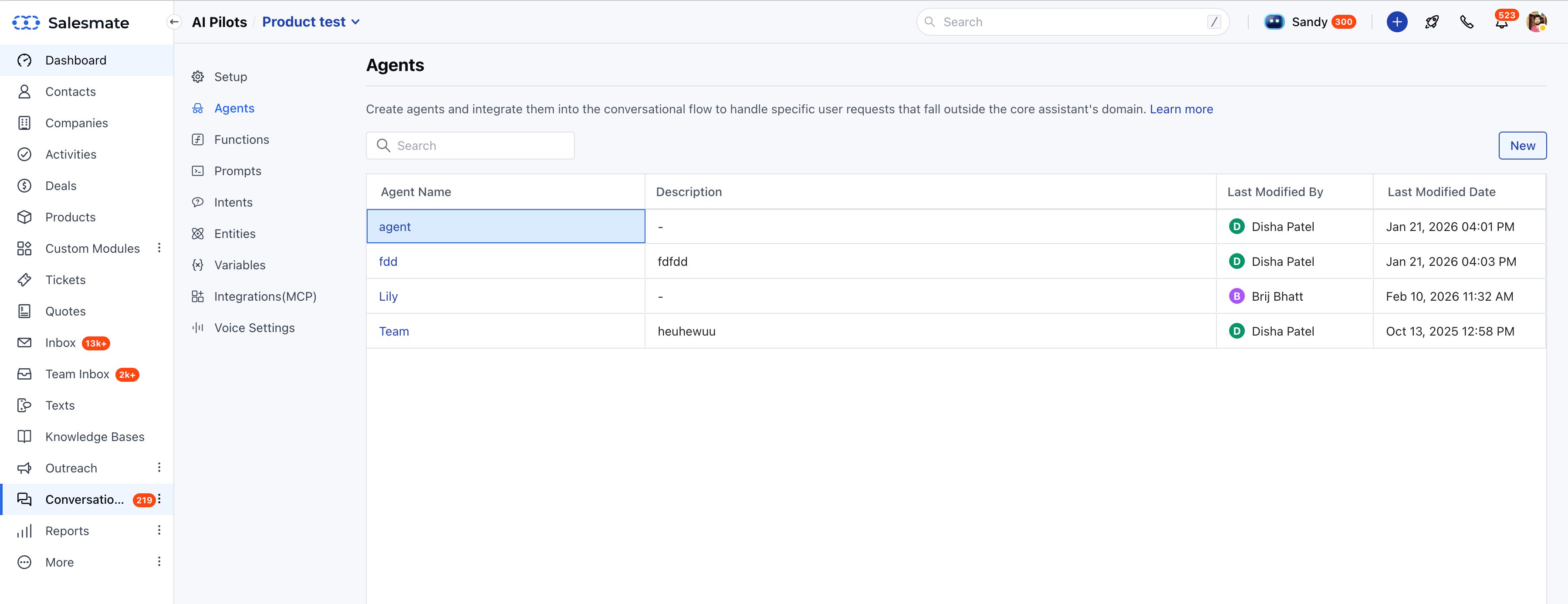
Platform Navigation - The IA made visible
salesmate.io · AI Pilots
AI Pilots - Agents · Full sidebar navigation reveals the four-pillar structure
The sidebar (Setup → Agents → Functions → Prompts → Intents → Entities → Variables → Integrations → Voice) directly maps to the Identity, Knowledge, Behaviour, and Playground pillars - the IA is built into the product's navigation.
06

Information Flow

Before moving to pixels, I mapped how a user's question travels through the system - from chat input, through the agent's knowledge base, to a final response. This helped align Design and Engineering on what needed to be surfaced at each step.

User Query Flow - Design ↔ Engineering Alignment
USER Chat Input "What's your pro plan?" STEP 1 KB Lookup Match query to sources STEP 2 Synthesise Generate response draft STEP 3 Guardrail Check Within scope? Safe? ✓ Agent Responds Shown in chat UI → Human Handoff Outside scope / rule triggered DESIGN CONCERN: What does the UI communicate at each step?
07

Visual Solutions

A
The Hiring Mental Model
Talk Like a Manager, Not a Developer
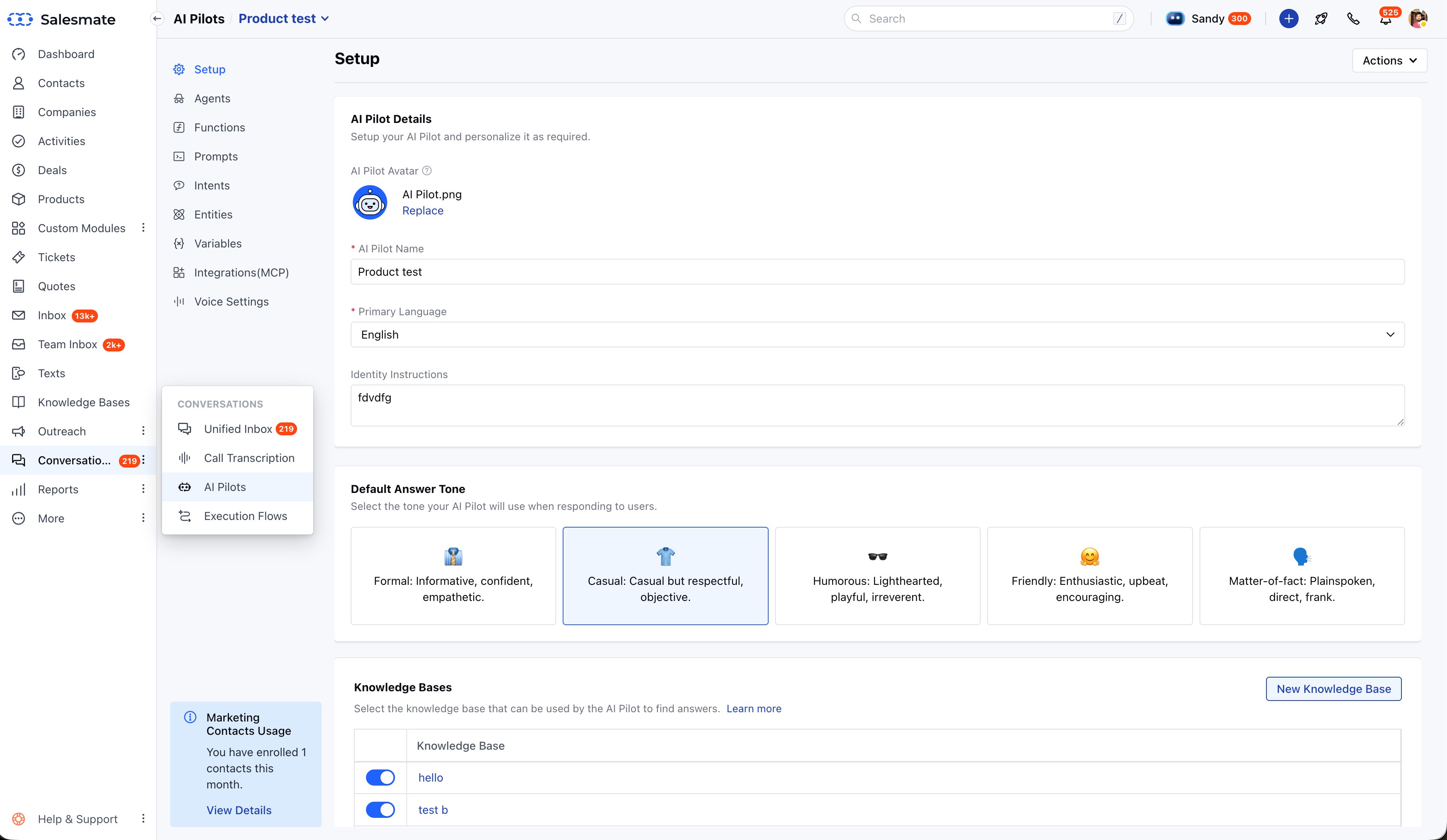
Instead of asking for a "system prompt," I designed fields for Role, Goal, and Tone - language the user already understands. The system translates these inputs into the technical configuration in the background. The user never sees that layer.
Screen - Identity / Setup Tab
salesmate.io · AI Pilots
AI Pilots - Setup · Name, language, identity instructions, and tone selector
The tone picker (Formal / Casual / Humorous / Friendly / Matter-of-fact) replaces the concept of a 'system prompt' entirely. Users pick a personality - the platform handles the configuration.
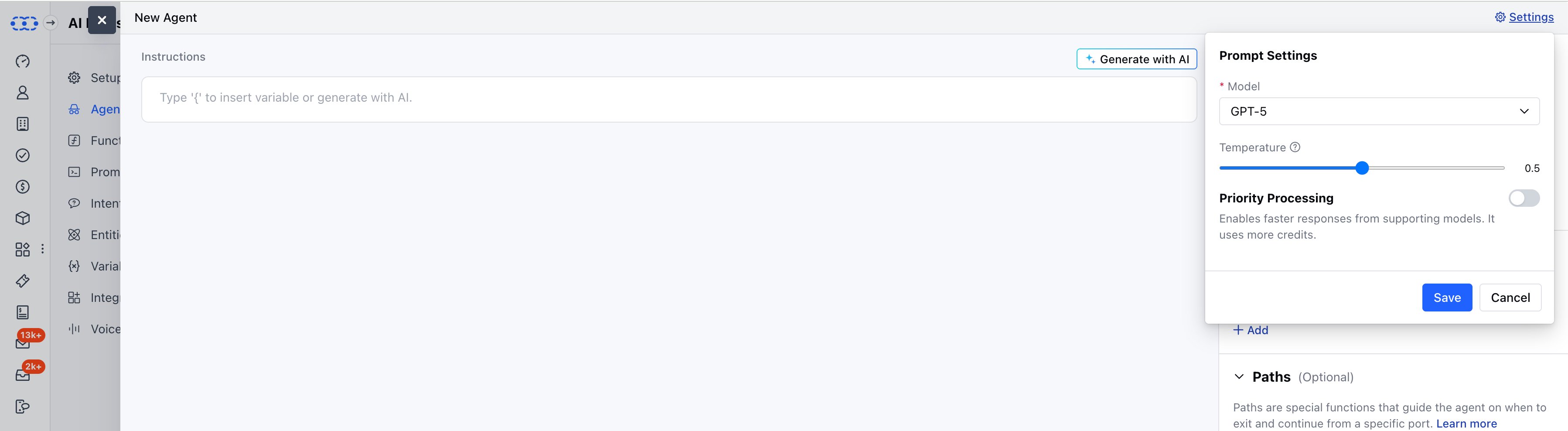
Hidden Layer - What users never see
salesmate.io · AI Pilots
New Agent - GPT-5 model, temperature, priority processing
This is the technical configuration layer - GPT model selection, temperature slider, priority processing - that exists behind the simple Setup UI. The design decision was to hide all of this and surface only what the user actually needs to make a decision.
B
The Knowledge Base
Show the Agent Exactly What It Knows
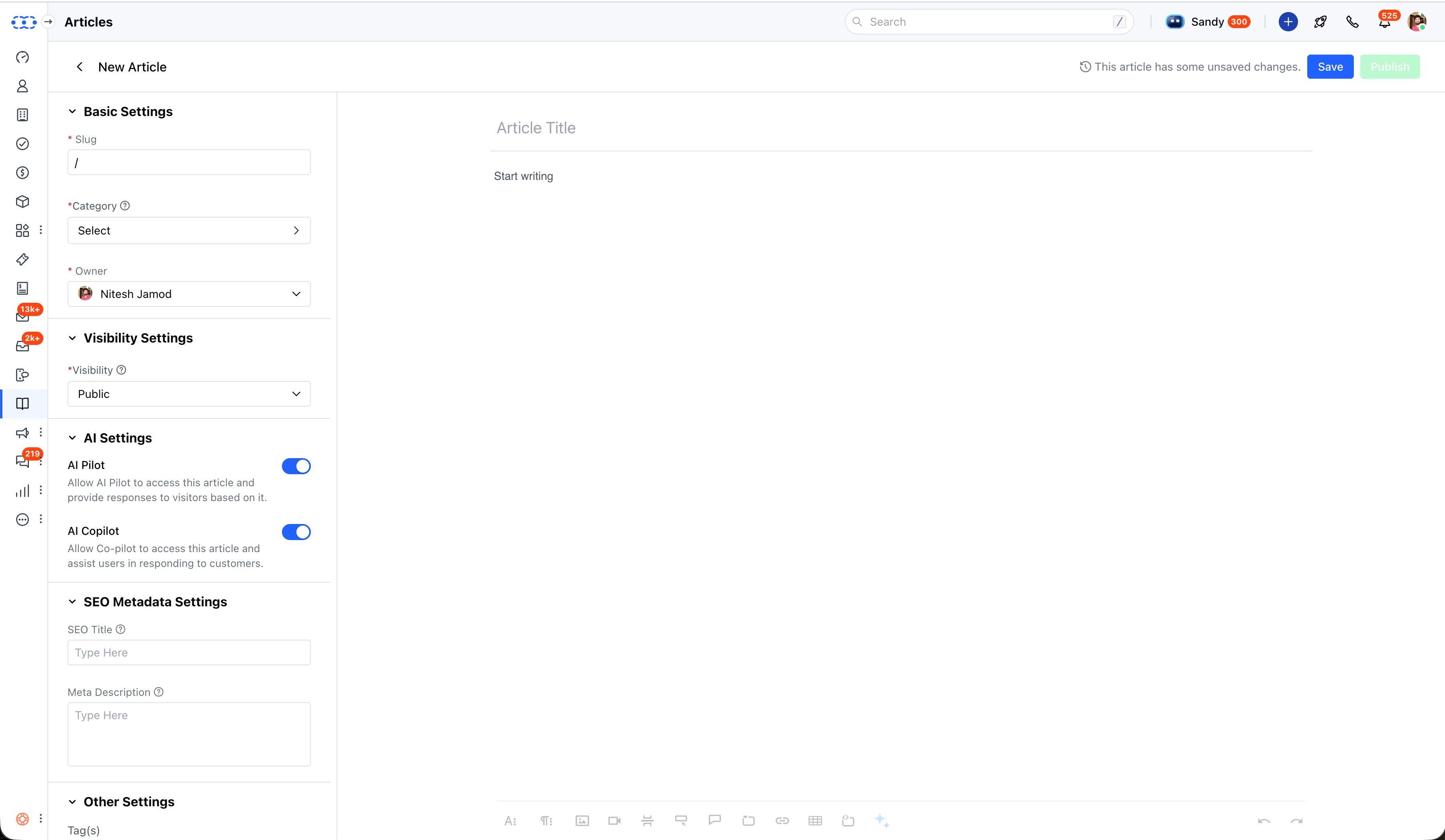
To solve the trust problem, I designed a transparent file manager. Users can see every PDF, URL, and document the agent is reading from. If something is outdated or wrong, they can remove it instantly - giving them full control before going live.
Screen 1 - Knowledge Base Setup
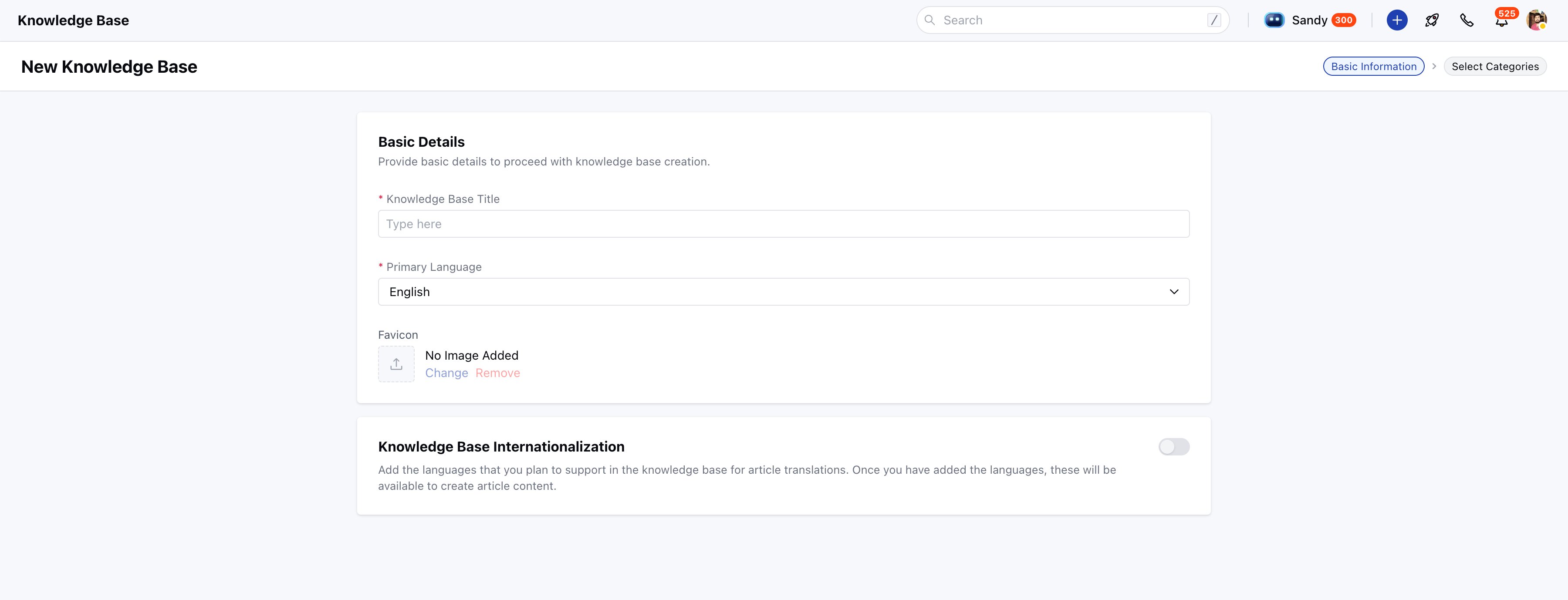
salesmate.io · AI Pilots
New Knowledge Base - Basic information
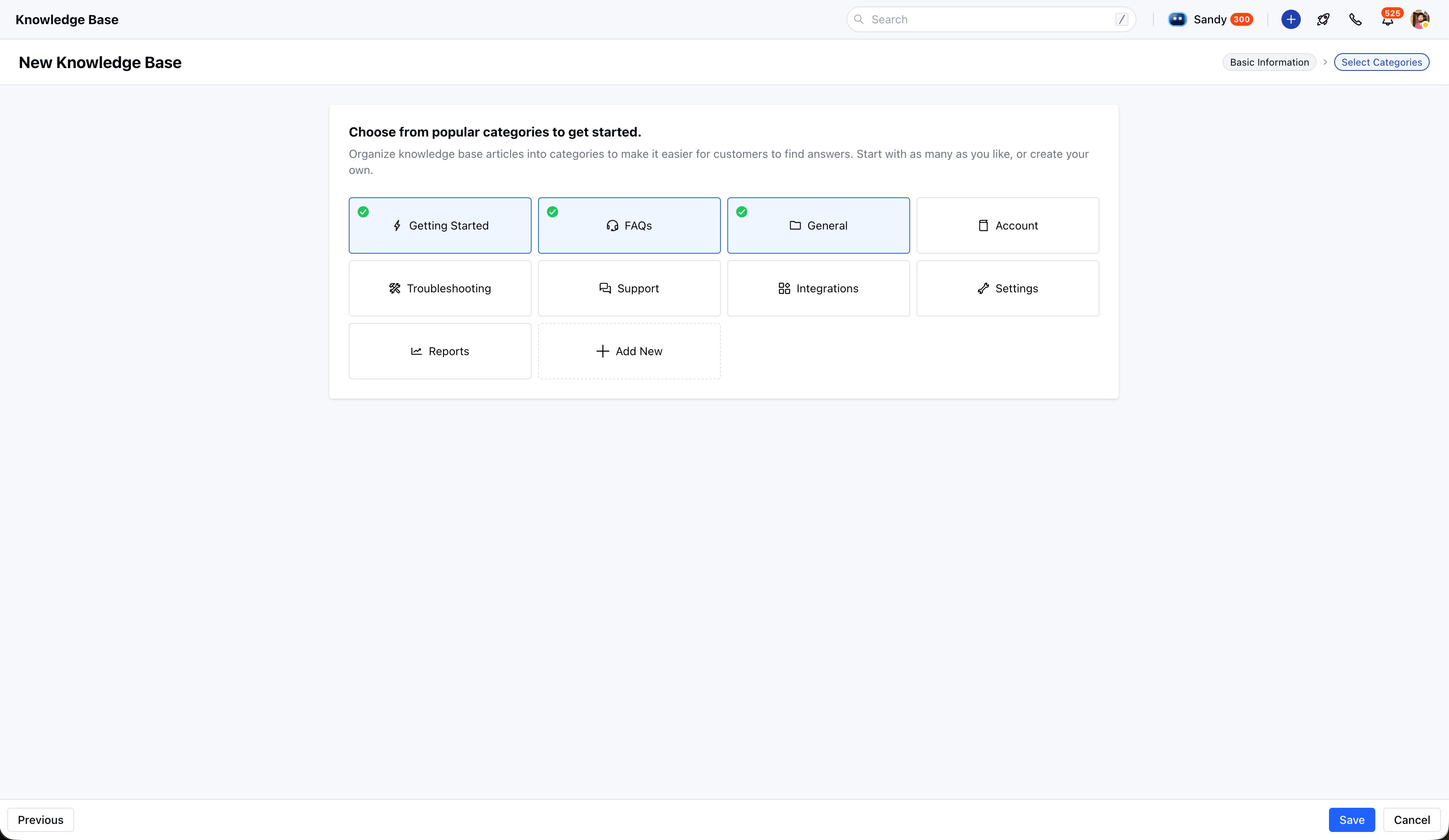
salesmate.io · AI Pilots
Knowledge Base - Select categories
Screen 2 - Article Editor with AI Controls
salesmate.io · AI Pilots
Knowledge Base - Article editor · AI Pilot and AI Copilot toggles
Each article has explicit controls for whether the AI Pilot can use it to answer questions, and whether AI Copilot can reference it to assist human agents. This gives the admin full transparency and control over what the agent knows.
C
The Real-Time Playground
Test Before You Deploy
A split-screen view: settings on the left, live chat preview on the right. Change the tone, the agent responds differently - immediately. This tight feedback loop let users experiment freely and build confidence before going live. No deployment anxiety.
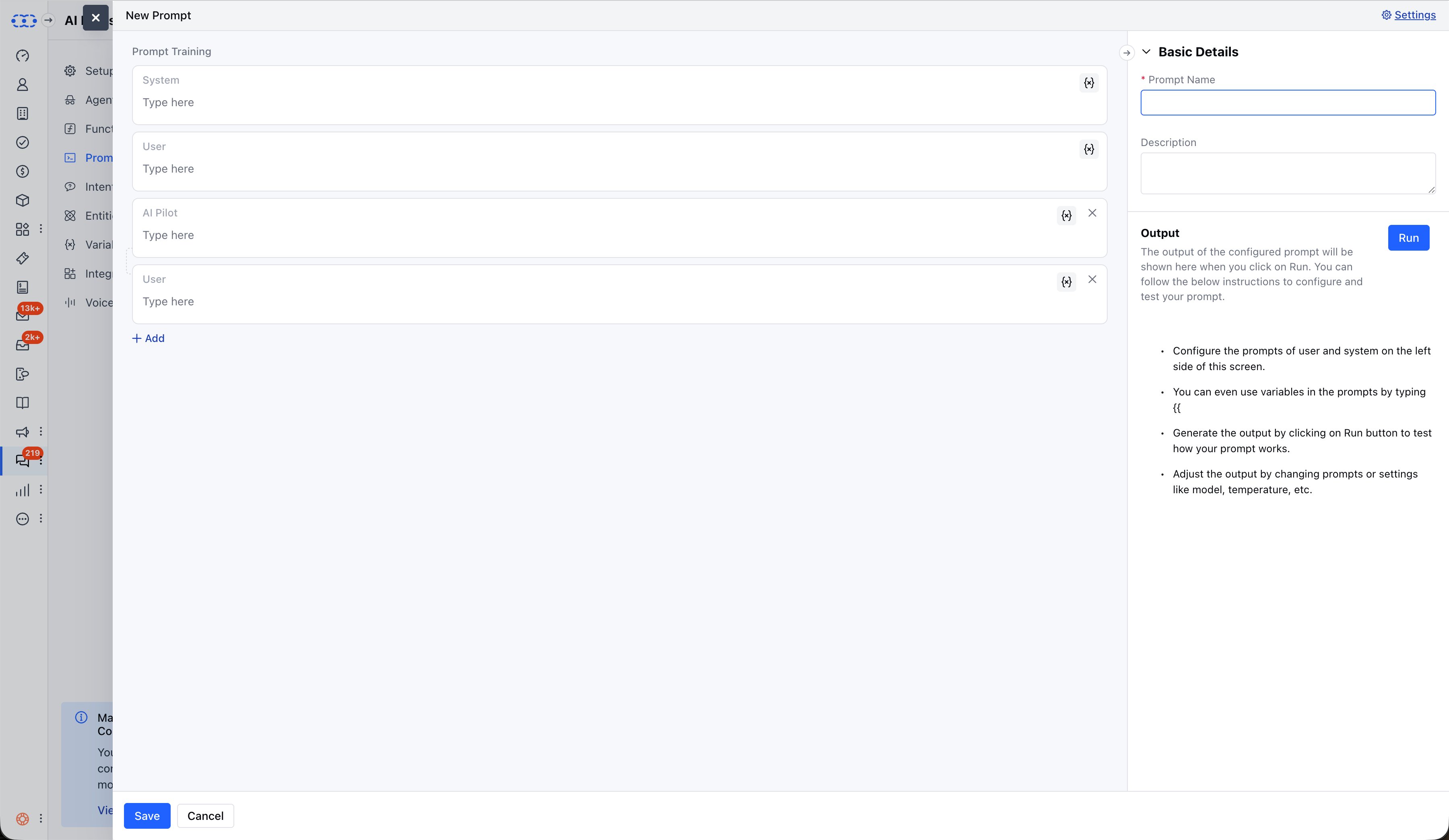
Screen - Prompt Training & Testing
salesmate.io · AI Pilots
New Prompt - System, User, and AI Pilot fields with Run output
The prompt training interface lets users define System and User prompts, then click Run to immediately see the AI Pilot's output. This tight feedback loop - write, run, adjust - is the playground that builds confidence before deployment.
08

Design System

New components were built on top of Salesmate's Global Design System and fed into sm-framework - Salesmate's internal Angular component library documented in Storybook 8.

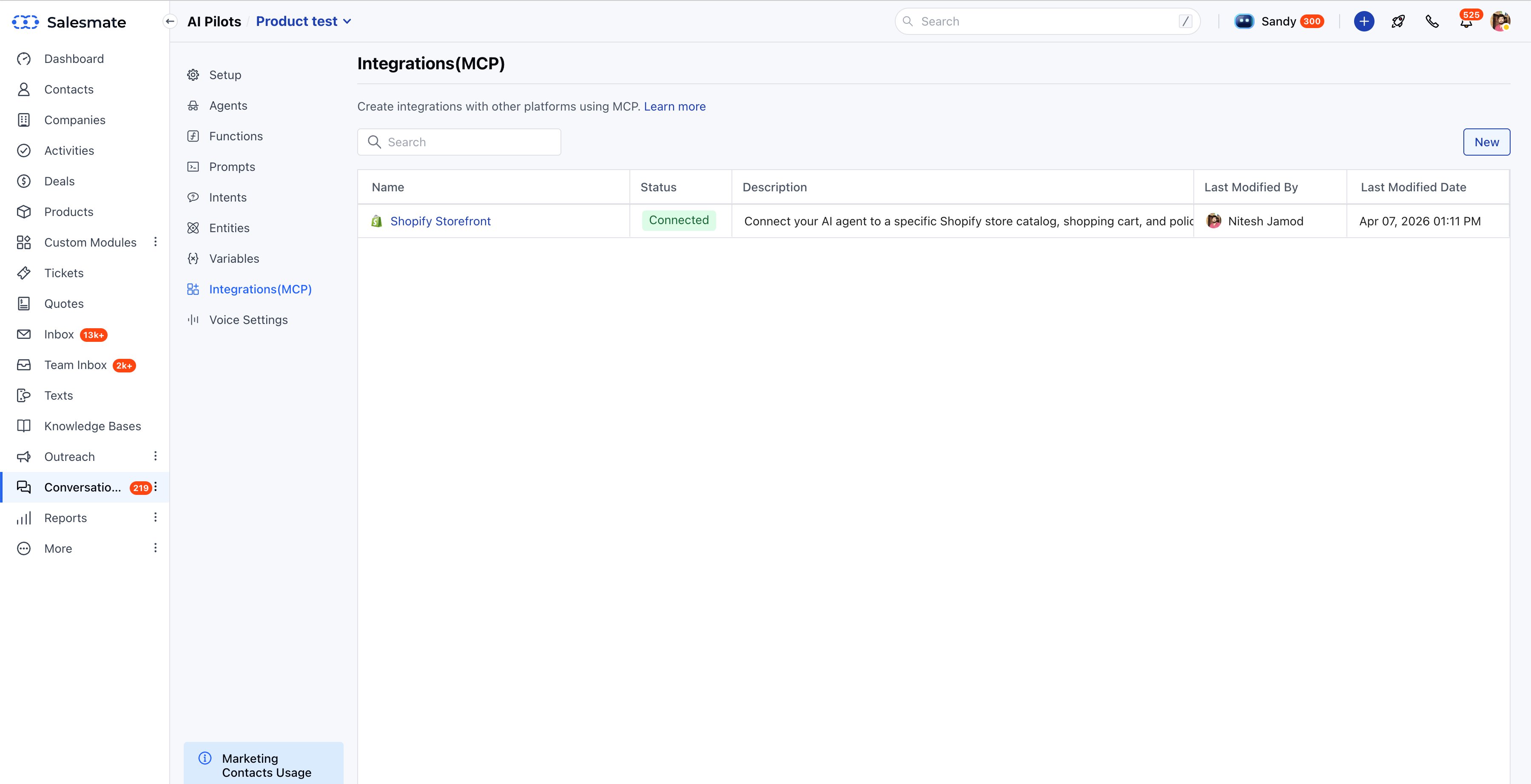
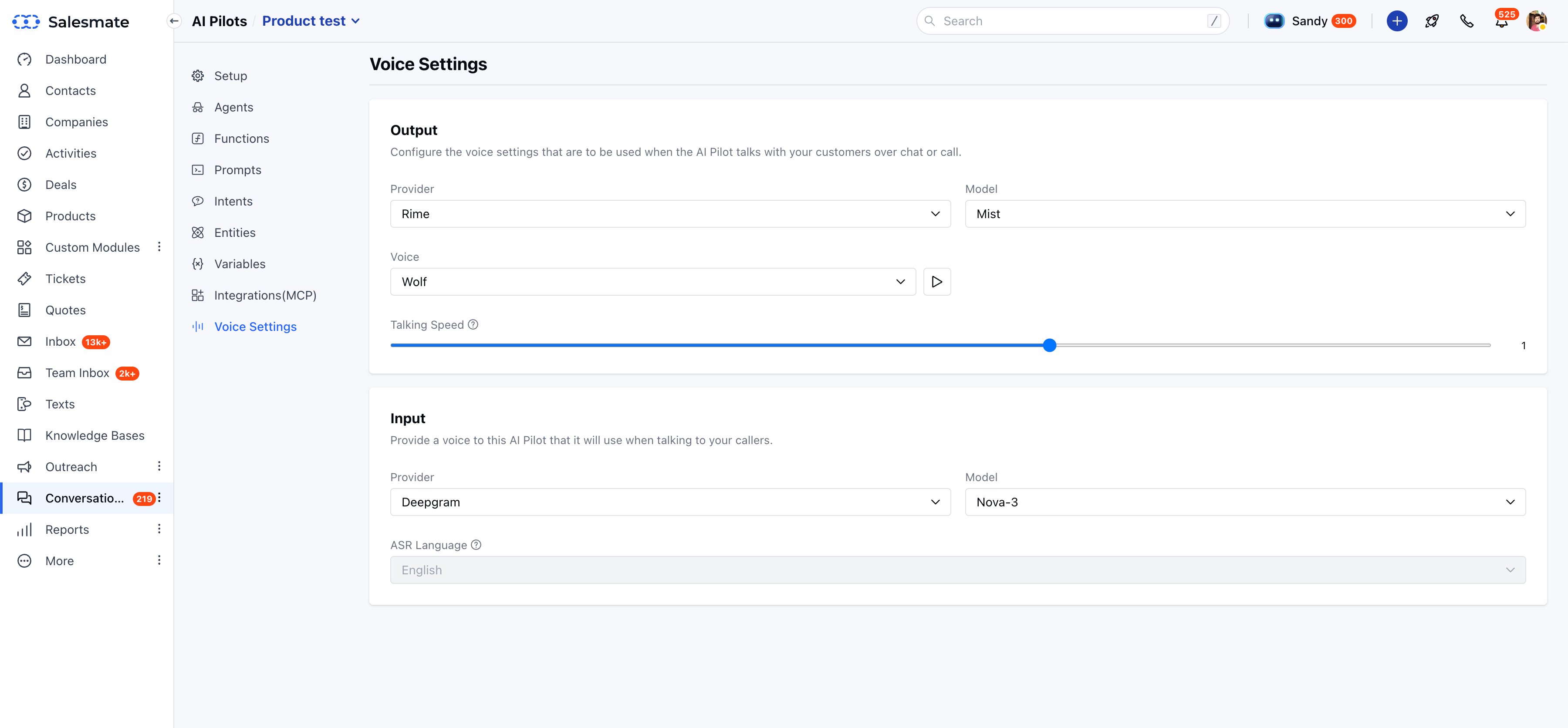
Platform Depth - Integrations & Voice
salesmate.io · AI Pilots
Integrations (MCP) - Shopify Storefront connected
salesmate.io · AI Pilots
Voice Settings - Rime + Deepgram providers
Existing Foundation
Salesmate Global Design System
Core inputs, buttons, modals, and typography tokens pulled from the existing global system - keeping the agent builder consistent with the rest of the Salesmate product.
New Components
AI-Specific Patterns
New UI patterns including AI status indicators, "agent thinking" loading states, knowledge base file cards, and confidence displays - all documented in Storybook 8 via sm-framework.
09
"The success wasn't just in the UI - it was in the abstraction. We hid the complexity of AI behind a flow that felt like hiring a new team member."
Self-Serve Setup
Agent configuration moved from a developer-dependent process to something any sales manager can complete independently - no technical knowledge required.
User Confidence
The transparent knowledge base and real-time playground removed the fear of deployment. Users could see exactly what the agent knew and test it before going live.
Scalable Architecture
The four-pillar IA structure - Identity, Knowledge, Behaviour, Playground - scaled across eCommerce, retail, enterprise, and agency use cases without needing a redesign.